Editing History
Good editors offer document history. We want to provide a good editor.
There is a lot of research that has gone into document edit history before the writing of this dev log entry, so many things will appear to have been pulled out of thin air. E.g. our decision to use Automerge (https://github.com/automerge/automerge). Be assured, I thought about it too much and don't want to write about it now.
For our pre-release, I'm simply going to focus on a good local history that can later be expanded upon, first to cloud-sync, then to a Google-Docs-like collaborative editing experience.
I made this god-awful diagram in figjam while thinking on it, and it's going to stay roughly applicable for this local-only version history, and the next stage (cloud sync):
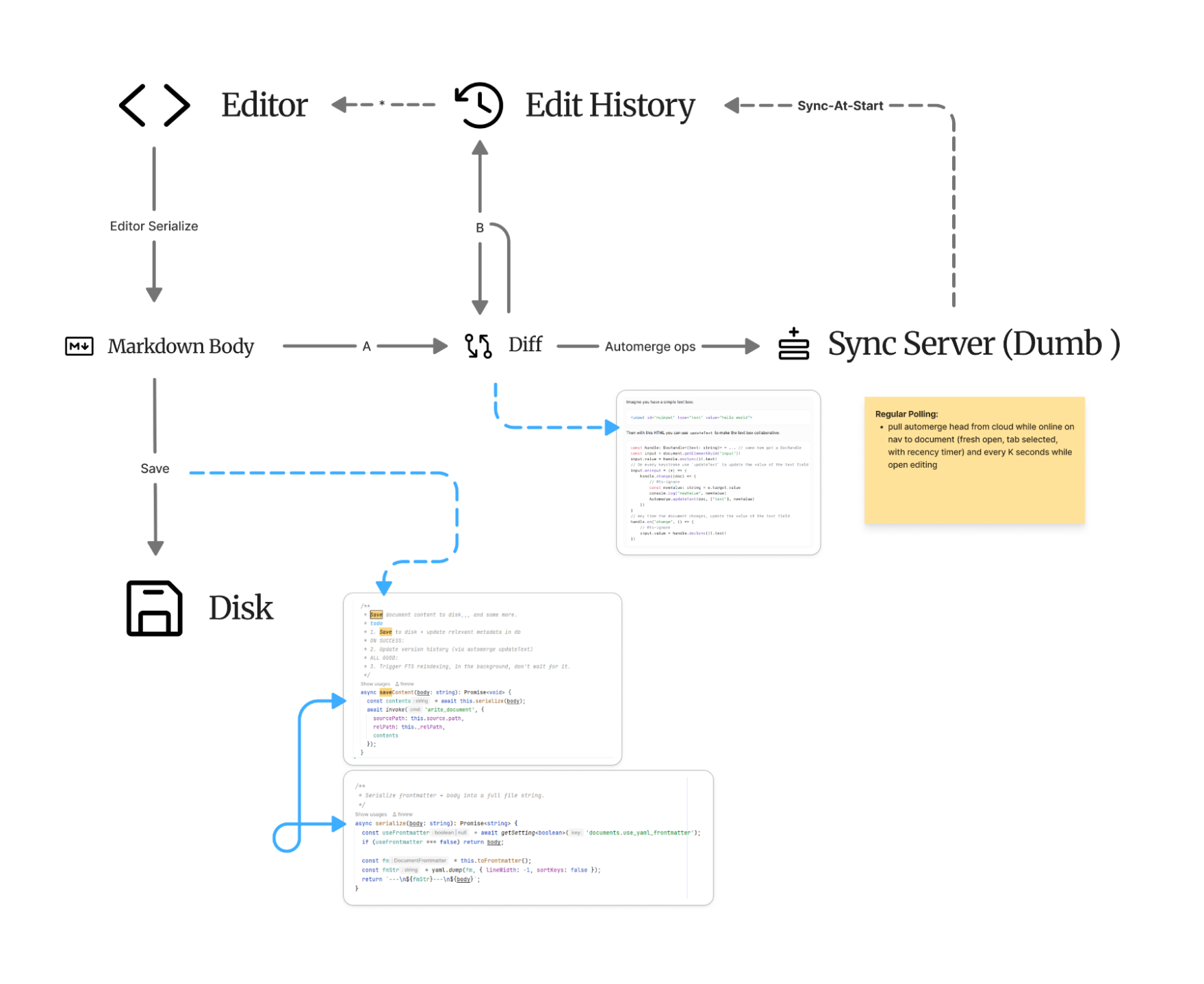
What do people actually want?
Okay, what do people actually use version history for? Uh, well, I mostly use it to grab old versions of paragraphs which I then paste next to the new version to compare and recombine if I liked specific phrasing.
Doing some quick research online and got mostly garbage SEO results, the internet is dead. So, I'm now considering my opinion expert and omnipotent, as I have conducted the largest ever (discoverable, subjectively) survey on the topic: 4 people, all computer scientists or data scientists. This incredible control group has allowed me to synthesize this objectively correct breakdown of how people use version history:
A) Fork/version comparison: basically, what I have now vs what I wrote while tired/drunk/high or feeling foolish.
B) Change recovery: shit, it seems I deleted a critical paragraph while baking in the Toronto hellscape (feels-like 47C, literally).
C) Psychological reassurance: okay, even though I'm a dastardly fool, I can't lose my work.
There could be other use cases, but they're statistically insignificant in my control group.
Specifics
So, of course, this shapes how the UI/UX should be done. You thought I was just ranting?
I looked into how other document applications are presenting it, and found a few things worth mention.
Google Docs, of course, with its side-bar and highlight approach. A bit dismal, in my experience -- feels a bit as if I'm swimming upstream trying to find the original version of a sentence or paragraph or an image I removed. Too many entries maybe? Dates to me also do not really correspond to anything specific in my meat-mind, except maybe my birthday and anniversary.
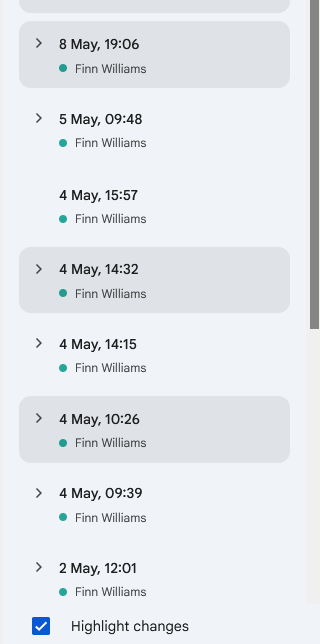
I am also quite ill with side bars, I've had enough, it's too much. I've developed a sensitivity to a high density of garbage information being on my screen, mostly due to having 150 tabs of documentation and papers open on my computer at all times.
"Oh just cease to be a fool, Finn"
That's asking a lot. That's like trying to train a dog not to eat treats dropped on the floor with a reward of treats. It's quite possible, but egregiously hard to apply to oneself. I need to be forced via the UI into being a good human, the treat being the lack of brain decay and preservation of my tattered attention span.
"Okay, so what do you suggest?"
Well in reading some online forums, I saw that 'simplenote' (a bit dead of a project, but with some nice UI/UX in places) has a history slider:
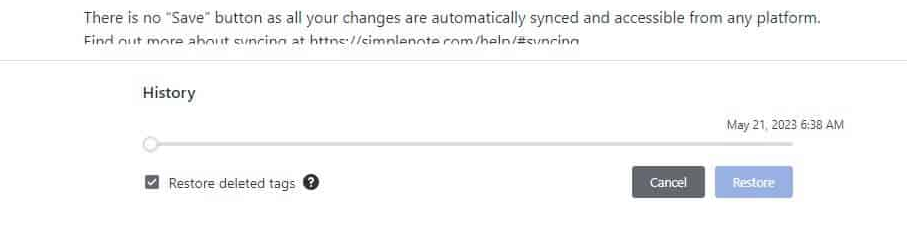
"Oh well how clever, use that!" You say, you indignant corporate dog.
Well, this is fine, but let's look back to our use cases and complaints about Google Docs' version history. This is just the very same UX as Google Docs with a better UI, given that if I made it, I would have ticks on it for changes made with dates.
No, what you actually want, dear reader, is this and a search! Easier said than done, however -- what are you even searching? What, precisely, do you see when you enter a query? Actually think about it, the history is not an array of full document snapshots, it's operations.
What are operations?
An operation is a small individual change.
Operations make up a series of small individual changes, that, if applied in order, could reconstruct a given text completely:1 [ insert "An operation is an" at index 0 - ] 2 [ delete "n" at index 17 ------------------] 3 [ insert " small individual" at index 17 - ] 4 [ insert " change." at index 34 ---------- ]
Let's work through some use cases of what we want to see:
--
"Oh I felt this was better before, let me see" (Case A, above)
What we (I) want:
- Highlight relevant text
- Select 'search edit history' in the context menu
- A list of previous versions of your selected paragraph
--
"Oh goodness me, I've drunkenly deleted my amazing essay hook" (Case B, above)
- Use the history slider until you see it again, copy it, close the slider, paste it back into your document
- If you remember some of the prose, search for it, see the paragraph marked as 'deleted,' and restore
--
"That's lovely, but how does this possibly work?"
It's a matter of creating a search index.
It can (and should be, for my sanity) indexed on-the-fly with Nucleo (https://github.com/helix-editor/nucleo), by tracing back the history from the present and forming change-groups.
Like this, they're formed based on edit-timestamp gaps:
< PRESENT >
[ op 42 - 2:34 PM ] |
[ op 41 - 2:34 PM ] |
[ op 40 - 2:34 PM ] |
[ op 39 - 2:34 PM ] | change group 1
      ~ 4 min gap ~
[ op 38 - 2:30 PM ] |
[ op 37 - 2:30 PM ] |
[ op 36 - 2:30 PM ] | change group 2
      ~ 9 min gap ~
[ op 35 - 2:21 PM ] |
[ op 34 - 2:21 PM ] |
[ op 33 - 2:21 PM ] | change group 3
      ~ 3 min gap ~
[ op 32 - 2:18 PM ] | change group 4
< PAST >
So have we figured it out? The history slider + the search + a right-click context menu that drains into the search? Not really, the case I mentioned above, looking for previous versions of a paragraph, really would only work with extra-fuzzy search (paragraph to paragraph matching), which is something I just made up now.
Other concerns, nonexhaustive, in brief:
-
External edits? Make a new history commit with updateText on rescan, all good.
-
Restore history? Make a new entry in the history for this restore, no 'current' changes lost. All good.
-
Metadata history (e.g. tags)? Imagine restoring an old version of a note and suddenly you can't find it because it also restored the old tags. Edit history belongs with the content body alone, in my opinion. But wait! What about in-body tags, expired wikilinks to renamed or deleted documents, etc.?
Handling this is extremely overwhelming, I think it's kind of a user problem honestly, as cruel as that sounds. It is ungainly to do search-and-replace on all documents AND their histories.
I'll put a link here to the implementation dev log once it's complete, wish me luck.